
women_cuckoo-clock

Nightingale Clock

I don’t know if this bird is a nightingale, but the sound it makes is definitely a nightingale.

The following site was implemented using WordPress.
The colors are more suitable for women.

It is used on the website of 美女照神社“(VIAMATERASU).

*/https://xn--vus607cbrfwdv34a.com/*/
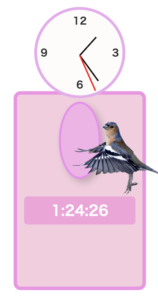
This plugin will send out a cuckoo dove at 00:00:00 every hour to let you know the time.You can choose the position of this clock on the screen with the following short-code.Insert the following short-code in your post or widget.

cuckoo_clock position=”center”
cuckoo_clock position=”right”
cuckoo_clock position=”left”
cuckoo_clock position=”bottom-right”
cuckoo_clock position=”bottom-left”

Bird images are licensed under Canva Pro.
Sound: https://soundeffect-lab.info/sound/animal/


A clock and digital date(right-bottom of the screen) 


You can change the position of the clock by changing the position of the shortcode.
• Display at the top left:
clock_display position=”left-top”
• Display in the center:
clock_display position=”center”
• Display at the bottom right:
clock_display position=”right-bottom”
• Display at the top center
clock_display position=”top-center”

A clock and digital date(the left side Top of the screen) 


If you install a WordPress plugin into WordPress, you can display a clock on a post or static page using a shortcode.
How to use it in WordPress
1. Activate “Custom Clock Plugin” in WordPress admin panel → “Plugins”
2. Write the following shortcode in a post or static page:
3. clock_display
4. A clock and digital date will be placed on the left side of the screen.

You can change the position of the clock by changing the position of the shortcode.
• Display at the top left:
clock_display position=”left-top”
• Display in the center:
clock_display position=”center”
• Display at the bottom right:
clock_display position=”right-bottom”
• Display at the top center
clock_display position=”top-center”