
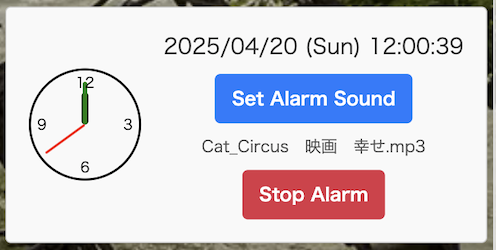
Place the shortcode wherever you like. [simple_alarm_clock] It will be placed at the bottom right of the screen. It will always be displayed at the very top. You can select music to play any mp3 type file. Music will play at the top of every hour, but if you do not select anything, it will be silent.

readme.txt
=== Simple Alarm Clock Widget===
Contributors: toolboxforpc
Tags: Clock,digital clock,watch
Requires at least: 6.8
Tested up to: 6.8
Stable tag: 0.0.1
License: GPLv2 or later
License URI: http://www.gnu.org/licenses/gpl-2.0.html
Requires PHP: 7.4.33
== Description ==
・A plugin that can be set to play music at the top of every hour. Any mp3 music can be used.
・A stop button appears while the music is playing. When the music ends, the stop button disappears.
The sound source is saved in a folder on your PC.
・When you want to stop the sound source, you can simply tap it to cancel it.
* About Simple Alarm Clock Widget
・No conflicts with themes have been found so far.
・If no sound source is selected, the sound source will not play.
・There is also a type with a timer, but for some people this may be an unnecessary feature.
The introduction site is https://toolbox.gardenplant.org/
* Procedure to be reflected in Simple Alarm Clock Widget
After downloading and activating the plugin, you can simply paste the shortcode into a post or static page to place it in the bottom right corner of the screen.
== Installation ==
1. Open the WordPress admin screen and click “Plugins” → “Add New”. Download the plugin you found.
2. Unzip the downloaded .zip file.
3. Click “Install” and then “Activate Plugin”.
== Frequently asked questions ==
Place the shortcode wherever you like. [simple_alarm_clock]
It will be placed at the bottom right of the screen. It will always be displayed at the very top.
You can select music to play any mp3 type file.
Music will play at the top of every hour, but if you do not select anything, it will be silent.